If Google keeps swapping which of your pages ranks for the same keyword, you’re not dealing with an algorithm update — you’re dealing with keyword cannibalization.
Keyword cannibalization defined:
When more than one page on your site targets the same keyword. Google gets confused about which page to rank, and your visibility drops.
Each time a different page takes the top spot, Google is signaling confusion about which URL best satisfies search intent. The result is a rollercoaster of instability — fluctuating rankings, lost momentum, and often no lasting visibility in the top 10 results.
What Keyword Cannibalization Looks Like
Imagine tracking one keyword across several weeks. Each week, a new page from your site takes its turn ranking — product pages, blog posts, or category pages all competing for the same term.
In this example, “cre developers” held the top position in organic search results, until the site started cannibalizing its own content. The result? Google has devalued the keyword, and the original post, which was once ranking in the top spot, is now on at least page two of SERPs.
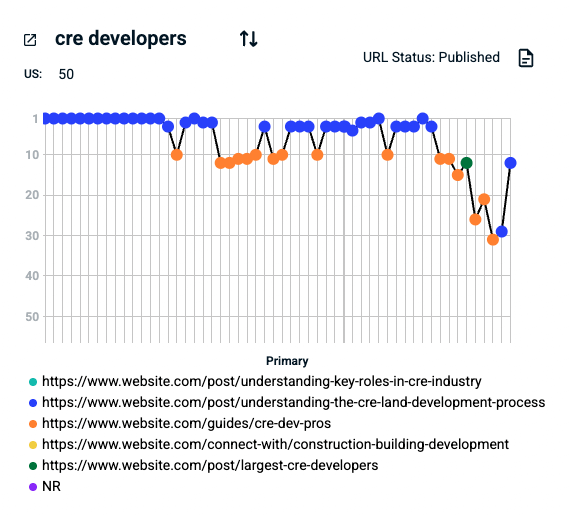
That’s Google guessing. When your site sends mixed signals, Google tests different URLs until it gains confidence in one or loses interest because it never gets a clear answer.
How to Address Keyword Cannibalization
The turning point comes when you create or refine a single, authoritative page that clearly satisfies the user intent behind that keyword.
To avoid keyword cannibalization,
- Create pages based on search intent (informational versus transactional, for example).
- Map keywords that align with search intent.
- Combine or “smoosh” similar content into single-URL in-depth guides.
- Internally link the pages to one another.
- Reinforce the preferred URL with canonical tags, sitemap inclusion, and consistent internal anchor text.
At first, the target keyword might bounce in and out of the rankings. But as Google observes consistent relevance and engagement, that page begins to stabilize — climbing, locking in, and holding its position. That’s when real SEO growth begins.
Using Audience Key to Fix Keyword Cannibalization
Spotting cannibalization sounds simple until you try to track which keywords have bounced between which pages over months of ranking history. Untangling it — and deciding what to fix first — is even harder. After running into this problem again and again, we built a feature in Audience Key to surface those blurred keywords clearly and show the pages involved. It gives you a straightforward view of where the conflicts are so you can start resolving them with confidence.
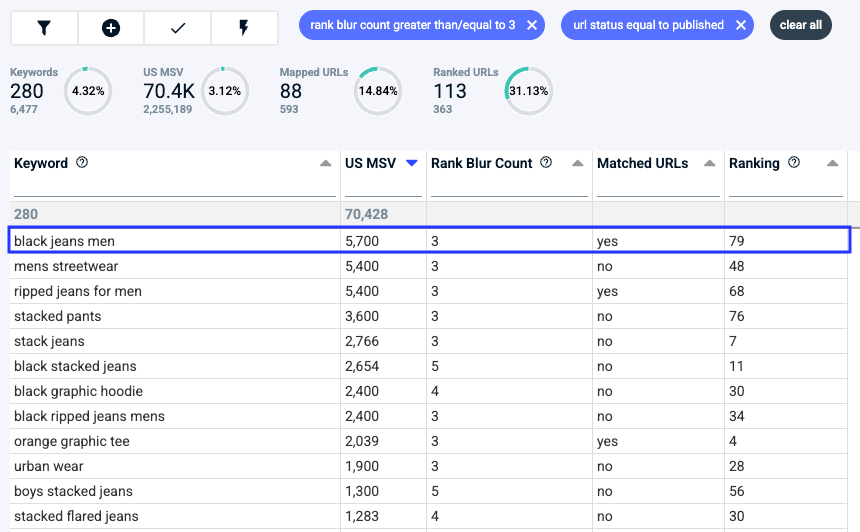
Here’s an example. The Rank Blur Count (Audience Key’s keyword cannibalization metric) tells us there are 280 keywords for this project that have blurred across 113 pages.

A “yes” in the Matched URLs column indicates the page we want to rank is, in fact, ranking. However, before we get too excited, we check the Ranking column.
Ranking over 10 suggests the keyword is not in top SERPs. So, “orange graphic tee” is a win-win: After blurring with at least two other pages, it’s settled on the targeted page and it’s fourth in Google organic SERPs.

“Black jeans men,” on the other hand, is buried deep in the bowels of Google search and blurring with at least three other pages, suggesting the keyword needs more attention.
To fix keyword cannibalization,
- Identify keywords where multiple URLs have ranked over time. Audience Key has a built-in tool to check for keyword cannibalization.
- Consolidate overlapping content into the preferred URL, redirecting or pruning competing pages.
- Update internal links so they point to the chosen page.
- Monitor rankings to confirm that Google has stabilized on the intended URL.
Why This Matters
Keyword cannibalization is one of the most overlooked causes of ranking volatility. When multiple pages target the same keyword, you dilute your authority instead of reinforcing it.
Once Google identifies a single, trusted page, your visibility strengthens across related searches — and your performance compounds.
With Audience Key, you can easily visualize and resolve keyword cannibalization through our built-in Keyword Blurring Report.
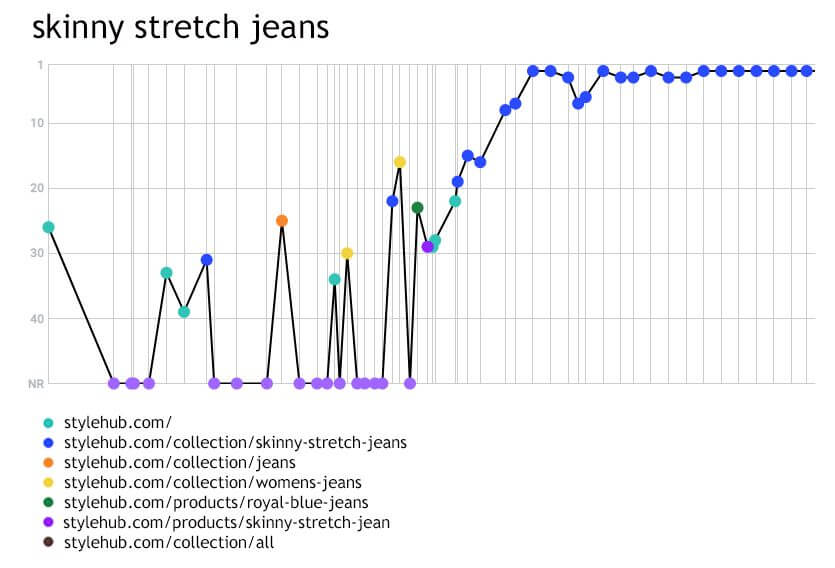
This report tracks how many different URLs have ranked for each keyword over time, and where those rankings overlap. When multiple pages compete for the same keyword, you’ll see the “blur” between URLs.
With this visibility, you can:
- Identify and prioritize cannibalized keywords
- Choose the right target page for each term
- Track progress as blurring between URLs fades
- Build lasting keyword-to-URL stability across your site
- Simple insight. Huge impact.